Showing posts with label ios 6. Show all posts

Friday, September 28, 2012

Find YouTube App Back to iPhone in iOS 6


When you said hello to iOS 6, you said goodbye to your iPhone's preinstalled YouTube app. Earlier this month, Google released a YouTube app for the iPhone and iPod Touch that introduces a new design and functionality. Google says there are "tens of thousands more videos" available with this app than you had with the old, built-in app. The downside is now that Google and Apple have parted ways here, Google can start serving ads on its iPhone app. I've watched dozens of videos with the new app, and can happily report that I was served an ad before only a handful of videos (though I wouldn't be surprised to see the frequency increase as time goes on).


Let's take a quick spin through the app.
After installing the app, you'll notice that the old TV icon is gone, replaced by a less fun YouTube logo. The app, too, boasts a new look. Tap the button in the top-left corner to reveal a slide-out menu, where you can sign into your account, access settings, see the channels to which you subscribe, and view YouTube's categories. You can't swipe to delete a channel from this menu. Instead, you must open a channel and tap on the green checkmark button at the top of the channel to unsubscribe.
In the top-right corner is the search button. Aiding your searches is auto-complete functionality, making suggestions as you go.
You have two options for how your Home Feed works. In settings, you can choose either Highlights or Uploads Only. These are slightly vague and inaccurate terms. Choose Uploads Only and you'll see videos that have been uploaded only from your channels. Choose Highlights and Google adds recommendations based on your viewing activity to the mix.
When viewing a video, you need only to rotate your phone into landscape mode to view the video at full screen. Rotate back to portrait mode to see the video's details, comments, or suggested videos. When viewing in full screen, you can tap on the screen to access the thumbs-up and thumbs-down buttons along with the share button. The sharing options have increased. Here's the list:
In addition to these options, you can also add it to watch later, add to favorites, add to a playlist, or flag as inappropriate. To find your uploads, playlists, watch later videos, open the slide-out menu and tap on your name at the top.
While you can view your uploaded videos, you can't upload videos you have on your phone from within the app. That's not a huge deal since YouTube is still one of the sharing options when viewing a video in the Photos app. A bigger omission is the lack of iPad support. The YouTube app is not universal, but Google says an iPad version will be out in the coming months.

Thursday, June 14, 2012

Simple comparison between three operating systems: Apple iOS 6 vs. Android vs. Windows Phone


June is really an exciting months for all smartphone fans. Apple kicked off its WWDC this Monday with the unveiling of iOS 6 for its iPhone and iPad, which was claimed to own more than 200 new features. The only defect of 2012 WWDC is that there’s still no introduction of iPhone 5, which is rumored to most possibly adopt iOS 6, A6 processor, larger screen display, higher screen resolution, etc. to produce better experience for users to watch HD movies on iPhone 5, play games, own better experience in surfing the internet, etc. And also, in this June, Microsoft is expected to unveil the next generation of Windows Phone at an event next Wednesday, June 20, while Google is expected to reveal its plans for the next version of Android, codenamed "Jellybean". What an exciting month it would be!

With the release of iOS 6 and its big improvements, we may want to see which one of the three operating systems would be the best for ourselves. Here, PCworld has just made a comparison chart to show the difference of Apple iOS 6, Android and Windows Phone. Let’s have a look:
While some of the iOS 6 features Apple announced on WWDC already exist on Windows Phone and Android, Apple is putting its own twist on these updates. For example, Siri, Apple's voice-activated virtual assistant, is even smarter now with support for sports, movies, and restaurants. Siri can also directly launch apps, but you still can't control these third-party apps with your voice. What’s more, more languages are supported by Siri in iOS 6, like Korean, Mandarin, Cantonese, Taiwanese.

In Ios 6, Apple also launched its own Maps application, which includes local business information, Yelp integration, real-time traffic updates, and turn-by-turn navigation. Naturally, Apple has also added Siri integration to maps. Apple has also added a 3D/fly-over mode to its Maps application, which shows you detailed 3D models of buildings and landmarks.

These updates certainly give Microsoft and Android something to chew on. While both competing platforms offer voice-command support, those features are crude in comparison to Siri's artificial intelligence and natural dictation. Microsoft's Bing Maps could definitely use a revamp in the next version of Windows Phone as its turn-by-turn directions feature is quite clunky (you must tap your phone at each turn).

What iPhone 5 features will be from this WWDC iOS 6 release

Apple has introduced the next best thing to all Apple devices users, the iOS 6, which is claimed to include more than 200 new features. The latest iOS will come out until the fall, and will only work on the iPhone 3GS and models after that, but a lot of iOS 6 features will be welcomed by any iPhone owner.

New versions of mobile software (be it iOS or Android) can often be as feature-packed and exciting as new phone models, and frequently kick a lot of new value down to older hardware. As for the iPhone 5 features and release time, Apple made no clear announcement.

The question is, can we look into the new features of iOS 6 to peer upstream at what Apple's next iPhone might be like? Well, here’re some guesses about the features of the next Apple iPhone, iPhone 5? Maybe.

Mobile Wallet
Passbook doesn't introduce much that isn't already available via other apps, but it's Apple's first baked-in commitment to digital ticket/coupon/account consolidation. The ability to add QR codes and other frequent-user cards may sound small, but if Apple can help pull the general public into using the iPhone as a digital wallet, then this could be the first step toward unlocking NFC and other swipe-to-pay functions in the next iPhone.

4G LTE
Obviously, the next iPhone will have 4G LTE. Duh. FaceTime will support cellular calls, seemingly just in time for these new 4G iPhones. Will FaceTime also support 3G calls? It should, since Skype already does, too.

Siri and Eyes Free: The new Siri
Last year, Siri was packaged as one of the main selling points of the new iPhone. This year, expect an improved, more integrated Siri and Eyes Free voice-control integration in certain cars as another new selling point. Some may have felt burned by Siri's lack of responsiveness or utility in the past, but it seems that Apple is set on making Siri indispensable.

Turn-by-turn navigation
Don't underestimate this feature. Apple's move to own turn-by-turn, rather than offload the responsibility to an app, makes the iPhone (like the 4G iPad) a true navigation device right out of the box. Some of the iPhone's new features, like Siri, have recently been more about software than hardware. Imagine Apple ads this fall focused on lost people finding their way, and so on.

A larger screen?
A bigger screen means better video enjoyment on iPhone 5, like watching HD videos on iPhone 5. Apple's new Maps app has impressive 3D flyover effects that could do with a bigger screen. Maybe this and Safari's new offline reading-list feature could point the way to the new iPhone being touted as "better for reading" or "better for navigation." A new screen is overdue; most of the Android and Windows 7 phone landscape has long since adopted larger displays. Apple would be playing catch-up to the rest of the big-screen phone industry.

Wednesday, June 13, 2012

Get iOS 6 features and see what features your Apple devices could run

Apple devices
With the approaching of 2012 Apple WWDC, the guessing for the upcoming iOS 6 and the next Apple iPhone has been even fiercer. The iPhone 5 is said to be released mostly this September. Apart from iPhone 5, the iOS 6 has also attracted people’s eyes. People want to know what features iOS 6 would bring and what features their Apple devices could run. If you’re one of them, this post would be right for you.

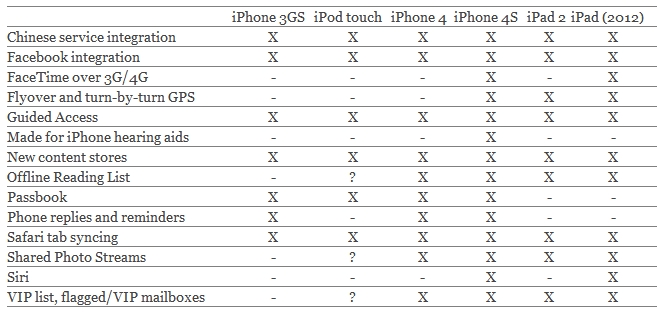
So you're eagerly awaiting iOS 6 in the fall, but you'd like to know just how many features you'll end up skipping if you cling on to your existing iPad, iPhone or iPod touch for one more generation. Apple has gone to the trouble of alerting would-be upgraders just what features they'll get when they check for the update this fall, and we've compiled it in a chart for an at-a-glance view of what you'll need. The short answer: you'll want an iPhone 4S if you're craving every iOS 6 feature. Some feature gaps are defined by obvious differences like the absence of cellular hardware, but the performance limits of the iPhone 3GS or fourth-generation iPod touch turn their upgrades into a patchwork. There's also a pair of questions about iPod touch support and whether or not "iPhone 4 or later" explicitly rules out the media player; we'll update should we know more. Either way, it's evident that Apple is bending over backwards to support burgeoning markets, but also that anyone who bought in 2010 or earlier is feeling the pressure to pick up something new -- especially original iPad owners, who can't upgrade at all.
iOS 6 features

Related guides on Apple devices