Part 1: 5 Best Tools to Turn Photos into Slideshow
1. Thundersoft Free Slideshow Maker
This is a free slideshow making tool for all users. Thundersoft Free Slideshow Maker makes it easy to turn your digital photos and videos into slideshows. It comes with ready-to-use animated templates, stunning transition effects, text captions, music and lots more. This professional and free tool provides over 70 transition effects and over 70 different animated templates for you. Besides, you can add WAV, MP3 or WMA music to the slideshow when you are making the slideshow and save your slideshow file as Flash / HTML, EXE, Screensaver, or Video files. You can view the slideshow on various devices including iPad, iPhone, etc.
2. Animoto
This is one of the easiest slideshow making tools for beginners or those who don’t need a lot of unnecessary features for making a slideshow. You can turn your photos and video clips into a professional slideshow video set to music in minutes. It's drag-and-drop easy. It requires expert knowledge from users. You can make a slideshow video with Animoto to share your cherished memory with your colleagues, friends and family. Like many slideshow makers, Animoto also offers multiple templates for making a fancy slideshow. If you want to make a slideshow with ease, you can try this one.
3. PhotoStage Slideshow Software
This powerful tool is not only an easy-to-use program but also offers many customizing features, such as zoom, crop, fade, pan, Ken Burns effect to make a fantastic and personalized slideshow. You can add photos, music, caption and narration during your slideshow making. A lot of users have been amazed by its stunning photo transitions and effects, photo optimization and audio editing tool. If you would like to try many features for a slideshow, then you cannot miss this tool.
4. 123-Slideshow
If you want to create a photo slideshow but don't want to spend time and effort to download the software on your computer, you can try an online slideshow maker, 123-Slideshow. This is based on HTML5, css3 and jquery and should work on any browser. There is no software installation required to use this tool. You can create a slide-show for your website in any size you like. This free flash slideshow creator allows users to create flash slideshows in seconds. The 123-slideshow.com slideshow creator requires at least 3 images. However, there is no maximum limit on a number of images.
5. Roxio Photoshow
Roxio Photoshow allows users to make a slideshow with both the user's own photos and video clips in one slideshow. With just a click or two, the all-new PhotoShow maker lets you add your choice of hundreds of music tracks, over 150 beautiful one-click styles, plus cool animated graphics and stickers. Add one of your own MP3s to your PhotoShow and give it the soundtrack you really want. You can create and share special moments in a fun, secure setting. Roxio PhotoShow Service entitles you to the desktop version, too.
Part 2: How to Burn Photo Slideshows to DVD Disc
Leawo DVD Slideshow Maker, formally known as Leawo DVD Creator, is not only a professional photo to DVD maker program but also one of the best DVD burning programs for Mac and Windows that offers easy but effective solutions for you to burn photo to DVD and convert photo slides to DVD disc, folder and/or ISO image file, no matter which formats your photo slideshow is saved in. It allows you to directly create photo slideshows from your personal photos and then burn created photo slideshow to DVD freely. You can add background music and transition effects to the slideshow to make a beautiful photo slideshow and then directly burn it to a DVD. It is also easy to operate. Here is how to directly create and burn a photo slideshow in Leawo DVD Creator.

Step 1: Directly import the photos that you want to make to a slideshow to the program by clicking the "Add photos" button.

Step 2: Get to the editing panel. Click on the editing icon as the following image shows. Then you can edit the video and audio effect.

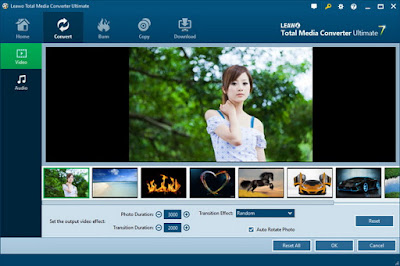
Step 3: In the Video section, you can see all the photos you've imported to the program being listed under the video preview window. You can rotate and delete the photos. Adjustable video effects include Photo Duration, Transition Duration and Transition Effect.

Step 4: Go to the Audio section, click Add Music button in the middle to add music to the video as the background music of the video.

If the length of the music is longer than the video, the exceeded part of the music would be cut off and won’t be played. Choose the sound effect you like from Fade In, Fade Out and Loop Play.

Step 5: When you finish editing the slideshow video, you can choose to convert it into a Blu-ray/DVD folder or an ISO file and save it to your hard drive, or burn it to a blank disc. Please refer to Part 2: Step 4 on the video burning procedure.